I have long used a trackball rather than a mouse. It greatly helped my "computeritis" - sore hand/wrist/arm.
One of the first trackballs I used, and my longtime favorite, was the Kensington TurboBall. 4 buttons and a scroll wheel - which IIRC could also be clicked as a 5th button. But it was discontinued by Kensington, probably because it was a mechanical trackball, and had reliability problems. After many years all six (6!) of these that I had purchased failed. I have not had good luck with the used TurboBalls that can still be purchased on Amazon.
I am currently using the Kensington Expert Mouse. 4 buttons, and a scroll ring, non-clickable. Actually 2, one on either side of my keyboard. 2 more at work, 2 more at the coast, 2 more at my mother's house, and 1 in my suitcase for trips.
I guess that you can say I have liked the Expert Mouse well enough to buy 9 of them. Serious $$$s.
But: I dislike its incline - I am currently shopping for a mouse tray to give it a negative incline. Or at least foam blocks. But at least that is hackable, although even a non-tilting mouse tray costs more $$$s. I have even tried using the trackball upside down, to get the negative incline I want. Works okay, but the USN cable gets in the way.
Worse: I have come to realize that the ExpertMouse scroll ring is bad for my "computeritis". Scrolling a ring is a much more complicated movement than scrolling a wheel. It uses many more small muscles. And my hand/wrist gets sore.
I wish I had my old scroll wheel.
I have been worked on AutoHotKey scripts to scroll using the actual trackball. Works somewhat. Most existing scripts require holding a key to scroll with trackball, which hurts; but it's easy enough to make a key press and release toggle the "scroll with trackball" mode. Worse: in AutoHotKey scrolling with trackball seems to require a timer triggered polling function, wasting power. Plus other issues as I mention in an AHK forums post: problems with displays that have different display scaling, cursor flickering, etc.
I am considering buying a trackball that has a real scroll wheel.
Or possibly one of the ITAC trackballs, that has a mode button converting it into scroll mode: the ITAC Evolution 149$ 6 buttons or ITAC Professional 189$ 4 buttons. The former's 6 buttons can all be configured. No driver SW required. OS independent. But probably only scroll up/down - no scroll left/right, without more OS dependent AHK scripts.
BTW, more and more I prefer OS independent driverless devices. Programmable once, then works everywhere else. E.g. I might be able to program mirror images of the ITAC Evolution, so that my left and right thumbs always hit the same button.
I am seriously considering buying the ITAC Evolution,. But since I nearly always buy more than 1, this quickly becomes serious money. Still, hand pain preventing me from working can cause serious loss of income.
Friday, June 21, 2019


Wednesday, May 08, 2019
OneNote LOG special page naming conventions
A "** Day LOG page".
Special page indicating start of a day.
NOT necessarily containing the actual log entry
Frequently empty, with OneNote pages for that day following.
Sometimes I add comments, etc., about the day.
The creation date for for a "**DayLogPage" is typically set to 12:00AM midnight on that day,
in the timezone I was working in at the time.
Mostly NOT using OneNote sub-page indentation
I would like to use OneNotes parent / sub-page relationships - but OneNote only supports 3 levels (top,sub,subsub), which is nowhere near enough.
E.g. I might like to have collapsible Week/Day/Topic/sub-Topic) hierarchy
. Spacer Pages
I find it convenient to have spacer pages in the list of pages within a OneNote section.
Since empty pages get "Untitled page" implicitly supplied, instead a use pages whose title is as close to invisible as possible, just a "." (period).
---+ section special pages
I use these to divide the pages for a day into sections.
---+, ---++
Default sections are for sorting - taking Raw LOG pages, and dividing them into work and non-work related pages, so that I can separate work and non-work
---+ Work - Restricted
Stuff that is work restricted, sensitive, or proprietary - stuff that should be moved to a company notebook, stuff that I am not
Sometimes I may leave a link to such work restricted stuff around in my personal notebook LOG.
Sometimes even the title of the page is restricted.
---+ Work - Related - Public or Personal
Stuff that is work related, but which is not company proprietary, or secret. Stuff that may be left in my personal notebook - although I may move a link to my work notebook
E.g. HR stuff.
E.g. public technical papers, that I think may be relevant to work projects.
Stuff that is not work related. Stuff that need not be moved or linked to a company notebook.
Not distinguishing public, personal, private. Assume personal or private.
---+ Not Yet Classified
Typically I insert a block of special pages
** Tuesday, March 19, 2019
---+ Work - Restricted
---+ Work - Related - Public or Personal
---+ Personal or Public - not Work Related
---+ Not Yet Classified
collect OneNote pages under the ---+ Not Yet Classified
special page "section",
and then during review move them to the appropriate classification,
and thence to the appropriate company proprietary or personal notebook,
Monday, February 11, 2019
DHMXDC Surface charger: fails new PC, works old PC
I wanted to post this review on amazon.ca, but was not eligible[*], so I am posting here:
DHMXDC Magnetic US Plug Power Supply AC Adapter Cord for Microsoft Surface Pro 3/PRO 4 Intel Tablet (Pro 3 Adapter Without Usb)(Taboe Charger)Sold by: DHMXDCCDN$ 20.00
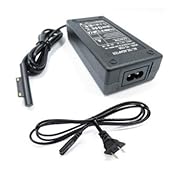
I forgot to bring an airplane-ready[**] laptop charger on a recent trip, so I purchased this from amazon.ca on the plane while travelling to Canada.
This charger did NOT work with the Microsoft Surface 2-in-1 tablet PC I was using on the trip. When plugged in (a) the charger connector lights up, as if working, but (b) PC system icon reports "plugged in, not charging". This seems to be as reported by about half of the reviews.
I initiated a return request with amazon.ca the same day. The vendor responded, but had not authorized the return before I had to leave Canada.
On my return home, I found the the DHMXDC charger worked with an older Surface. I will therefore keep it - too much hassle to get the vendor to complete the return authorization - but I will be reluctant to work with this vendor again.
---
Note *: Since I live in the USA I normally use amazon.com, where I post reviews, rather than the Canadian site, amazon.ca which will not allow me to post a review unless I have purchased 50$ in the last 12 months. Amazon.com will not allow me to post a review for a product I purchased on amazon.ca
Note **: by "airplane ready charger" I mean a charger that will work with the power outlets on many airlines. The surface dock that I was travelling with drew too much current, and caused the air line power outlet to shut off.
Wednesday, December 26, 2018
IT forced password changes => weaker password
Every time my company's IT forces me to change my password, my password becomes weaker.
At least, the password(s) that I actually have to enter by hand, manually.
Frankly, I don't care about weakening the passwords for my company accounts. After all, it's their IT department that is enforcing this obsolete policy.
But it is annoying that company IT also forces me to change my personal password on my personal machines that I use to log in to company email and VPN. Those personal passwords start out really string, but get weaker every time IT forces me to change them. So it's my personal security that is being messed up by company IT.
Thursday, June 28, 2018
Treadmill (desk) needs speed ramps and intervals
I continue to love my LifeSpan TR1200-DT3 treadmill, since 2014.
At first I could only walk slowly, 1-1.4mph, while working.
Then, a year or so ago, I started being able to hit 2-2.5mph for some tasks, like email triage.
Recently I have started being able to run >= 4mph, typically while listening to "XXX Update Meetings", where I don't participate, and often don't need to take notes.
But... sometimes I need to take a note, and may need to slow down. Not suddenly stop, but ramp down safely.
(Stopping suddenly can be dangerous - I have twisted my knee several times when the emergency stop engaged.)
PROBLEM: the LifeSpan console changes speeds in clicks of 0.1mph. Having to lean over and click 20 times to ramp down from 4.0 -> 3.9 -> 3.8 -> ... -> 2.1 -> 2.0 mph is inconvenient, and somewhat dangerous.
WISH: 2 or 3 speed buttons, with designated speeds. And a smooth transition between them, not instantaneous.
EXTRA WISH: I sometimes do intervals on my treadmill desk, while listening to such meetings. 20 clicks to change speed is a pain. After the 2 or 3 speed buttons, programmable intervals, would be nice.
DIY: yeah, I should do this in my copious spare time. There's a small community of folks who have made their own treadmill controllers using Arduino or Raspberry Pi or the like.
--
BTW, one big reason why I did not start running fast earlier was not my fitness level or even my sense of balance, but that I have had trouble adjusting the treadmill tension: if it runs smoothly at 0.4 mph it slips at 5mph, or it binds at 1mph when smooth at 5mph.
At first I could only walk slowly, 1-1.4mph, while working.
Then, a year or so ago, I started being able to hit 2-2.5mph for some tasks, like email triage.
Recently I have started being able to run >= 4mph, typically while listening to "XXX Update Meetings", where I don't participate, and often don't need to take notes.
But... sometimes I need to take a note, and may need to slow down. Not suddenly stop, but ramp down safely.
(Stopping suddenly can be dangerous - I have twisted my knee several times when the emergency stop engaged.)
PROBLEM: the LifeSpan console changes speeds in clicks of 0.1mph. Having to lean over and click 20 times to ramp down from 4.0 -> 3.9 -> 3.8 -> ... -> 2.1 -> 2.0 mph is inconvenient, and somewhat dangerous.
WISH: 2 or 3 speed buttons, with designated speeds. And a smooth transition between them, not instantaneous.
EXTRA WISH: I sometimes do intervals on my treadmill desk, while listening to such meetings. 20 clicks to change speed is a pain. After the 2 or 3 speed buttons, programmable intervals, would be nice.
DIY: yeah, I should do this in my copious spare time. There's a small community of folks who have made their own treadmill controllers using Arduino or Raspberry Pi or the like.
--
BTW, one big reason why I did not start running fast earlier was not my fitness level or even my sense of balance, but that I have had trouble adjusting the treadmill tension: if it runs smoothly at 0.4 mph it slips at 5mph, or it binds at 1mph when smooth at 5mph.
Google Blogger/Blogspot "Blog This!" plugin dead?
As of June 2018 the "Blog This!" plugin seems to have disappeared.
Sob! My second most frequently used plugin.
This may be my final straw for using Google Blogger / Blogspot.
Google Blogger / Blogspot has been dying slowly for years.
Monday, May 21, 2018
I want to like Windows Controlled Folder Access, but ...
'via Blog this'
I want to like Windows Controlled Folder Access. Essentially, restriction of access not just by user or group, but also by app.
But, of course, Microsoft made it so simplistic that gets in the way of my usage model.
For example:
---
This feels very much like Microsoft's initial, >10 years long approach to evolve network share permissions.
I hope that app permissions do not take so long.
I want to like Windows Controlled Folder Access. Essentially, restriction of access not just by user or group, but also by app.
But, of course, Microsoft made it so simplistic that gets in the way of my usage model.
For example:
- Lack of Exclusion
- There are protected folders. This is good.
- You can add more protected folders. This is also good.
- But you can't EXCLUDE subfolder trees from protection.
- This is bad..
- My usage model:
- I do a lot of my work in subfolders of Desktop.
- I do a lot of my work using ad-hoc tools, like Perl and Cygwin
- I would LIKE most of Desktop to be protected.
- But I would like to allow all or most, at least a large number, of cygwin apps to have access to subfolder trees such as Desktop/Work-In-Progress
- Apps are given all or nothing access
- You can add apps to the permitted list. This is good.
- But when you do so, the app is allowed to access all Cntrolled Folders. This is bad.
- E.g. I would like EMACS to be able to access my working areas, like Desktop/Work-In-Progress.
- But I would like to disallow EMACS from accessing, say, system folders, or Music, or ...
- Instead it's all or nothing. :-(
- Apps are individual
- You can add apps to the permitted list. This is good.
- But you have to add them one by one. This is bad.
- E.g. I use cygwin. I would like to add C:/Cygwin/bin/* to the permitted list.
- But that is too much of a pain, so I just disable Controlled folders
Basically, app permissions are just like user permissions. They need the same flexibility.
Controlled Folders does not.
---
This feels very much like Microsoft's initial, >10 years long approach to evolve network share permissions.
I hope that app permissions do not take so long.
Subscribe to:
Posts (Atom)