I often still debug via printf. Or, rather, via other code that eventually calls printf.
I used to feel guilty about this, embarassed that I did not always use a debugger like gdb. But then I heard some famous programmers say "I debug using printf".
Even better, since I started doing Agile, I spend less and less time debugging. (Conversely, when I work with legacy code, code that doesn't have tests, I spend more time debugging.)
Now, I have gotten better at using debuggers like gdb over the years. And some of my "add code" debugging cooperates well with debuggers like gdb.
For example, many many years ago another student/lab manager/research assistant/TA (who I think is reading this blog - thanks, Steve) said that he was in the habit of writing data structure printing tools and consistency checks, even if not used in his "production" code - if for no other reason than to be able to call them from a debugger. To this I add that such code is often also useful in automated unit tests. (Diffing taking into account hex addresses...) And also useful if you have to fallback to printf debugging.
What I like about printf debugging is that it often develops assets, code that can be reused. Both for future debugging, and for other purposes.
Whereas gdb style debugging often does not. Yes, you can write debug scripts - e.g. I found some useful scripts that can dump STL datastructures in a nice manner, rather than in the unreadable manner that so many debuggers print them. So-called symbolic, but not very high level.
Friday, May 25, 2012


assert/ignore pattern
Here's a pattern I observed today. I have seen it before. (In my wont to record neat little tidbits that m,ay be worthy of further thought.)
Started with code:
    Object* objptr = ...;
    assert( objptr->consistency_check() );
    assert( objptr->fooptr->consistency_check() );
    assert( more_consistency_checks(objptr) );
    ... do something with objptr ...
Now, often enough it might be correct not to error exit with an assert. Often enough, in my problem domain, if one of the consistency checks fails you can just ignore the object, and go on.
In my domain, computer architecture, this may arise because of speculative execution.
So, pseudo-equivalent code might look like
    Object* objptr = ...;

    if( ! objptr->consistency_check() ) {
    }
    else if( ! objptr->fooptr->consistency_check() ) {
    }
    else if( ! more_consistency_checks(objptr) ) {
        ... do something with objptr ...
    }
I know, you might prefer
    Object* objptr = ...;

    if( objptr->consistency_check()
        && objptr->fooptr->consistency_check()
        && more_consistency_checks(objptr) ) )
    {
        ... do something with objptr ...
    }
but I have found that I often want to do stuff like keep stats for which forms of inconsistencies were found,
i.e. which assert would have failed if we had been failing.
Or
    Object* objptr = ...;
    try {
      assert( objptr->consistency_check() );
      assert( objptr->fooptr->consistency_check() );
      assert( more_consistency_checks(objptr) );
      ... do something with objptr ...
    } catch(...) {
      ...
    }
although it can be unfortunate if the catch is a long way away from the assert.
You might want to specify the assert fail action at the assert - which is what the OF statements do.
---
No biggy, just a pattern I have seen before.
Thursday, May 24, 2012
Rewriting history in version control systems
Some people like rewriting history in version control systems.
These people do not want "history" - they do not want an accurate record of events. They want a "narrative", an arc of development. With some of the ugliness and irregularity of what actually happened removed.
--
Recently overheard: "Oh, we can't go back to the version used for that test, because somebody rewrote history."
--
My take, as explained earlier:
Record the history. The real, raw, history. (Heck, I am occasionally willing to check in broken code - on a branch., NOT into the main line. NOT released to others.
E.g. sometimes it is worth recording, in the project history, all of the standing upon your head that you had to do to work around compiler bugs.)
But clean up the history, the logs, the narrative, when releasing. Merging back into parent branch. Etc.
And teach people how to look at the cleaned up history, the narrative. And only have to look at all the details if absolutely necessary.
--
A simple example of a narrative versus history:
It sometimes happen that two features are implemented in an interleaved manner:
Feature A - first step
Feature B - first step
Feature A - second step
Feature B - second step
Now, while it would be nice if somebody created separate branches for feature A and feature B, we all know it doesn't always happen. That is why we may be rewritging the history, cleaning up the narrative.
It may look better as
Feature A - first step
Feature A - second step
Feature B - second step
Feature B - first step
i.e. do both steps of Feature A, then both steps of Feature B.
Or even, retroactively create separate branches.
This can actually be accomplished by creating new branches, selectively patched and merged.
But, it may not be worth the work to do this.
But it may be worth the work to record the narrative showing it. So long as the actual history is also stored.
Heck, perhaps tools could make it easier to reconstruct the narrativem, as it woulda/coulda/shoulda happened. Albeit with a warning "This is not an actual historical reconstruction, so it may not actually work".
Sunday, May 20, 2012
file.ext and file.ext-DIR/ versus file and file/file
I learned a long time ago that what starts out as a single file often becomes a directory.
E.g. one of my first "open source" things was my debug header, debug.h. Standardly ~/src/libag/debug.h
But many years later I drank the koolaid of testing, so I wanted debug-test.c. And a Makefile. Where did I put it?
Separate files makes it easy to copy debug.h without the tests:
    ~/src/libag
          debug.h
          debug-test.c
          Makefile
          some-other-lib-header.h
And the Makefile would have to have stuff for all the things in the same directory. Messy.
So I learned that it was good to create "directory objects" for such things. Places where all of the usual things, e.g., associated with a single header-only library fo:
tests, Makefiles, README, man pages, etc.:
    ~/src/libag
          debug/
              debug.h
              debug-test.c
              Makefile // just for debug.g
          some-other-lib-header
              some-other-lib-header.h
              test-some-other-lib-header.c
              Makefile // just for some other lib header
So, all is happy. It is slightly annoying to have to type debug/debug.h, as in
#include "debug/debug.h"but I am willing to do so to get the goodness of directory objects. But then I encounter... barbarians. Tools that do not use "directory objects". E.g. I recently had to debug my X windows setup. I'm learning that even simple stuff in something like a .twmrc needs tests. Where do I but them? .twmrc is in a directory, ~/, shared by many tools. Convention: create .twmrc.DIR, and put the stuff in there. Generalization: given a file "file" that is not by itself in a directory "file/file", create "file.DIR/" as the place to hold such meta-information. === It might be nice to make this transparent: Create a file "file", and let it live without the stuff that I put in the accompanying or enclosing directory. As long as it needs to. But when it comes time to create the accompanying stuff, the meta stuff, like READMEs and manual pages and tests and examples and makefiles... - allow file.DIR top be created. (Or cvall it file.meta, or ...). But make file and file.DIR semi-transparent. If you do "cp file dest ", then it is equivalent to "cp -R file file.DIR dest". Or, rather, perhaps, use the old concept of filesystem forks, such as resource forks. Make "file" be an alias for "file.DIR/file".
Saturday, May 19, 2012
X widgets bad sizes in twm RightTitleButton due to LANG=en_US.UTF-8 fixed by unsetting LANG or setting LANG=C
Since I got to my current employer last October, I have been suffering problems with my X setup.
First: admission: I still use twm. Or, rather: twm has been my fallback window manager for years, when other X setup breaks. As it so often does.
Instead of the widgets at the top of my windows being nice and compact:

They were "blown up":
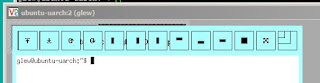
This was particularly painful when working on my tablet PC, 1366x768. Too much screen space lost. Got in the way of doing useful work.
I have avoided the problem all this time, 8 months, by not using my laptop except when plugged into external monitors with lots of pixels.
Well, this week I away from my external monitors. So I figured out what the problem was.
By process of elimination:
The problem that was causing the twm RightTitleButtons to be too large was due to
LANG=en_US.UTF-8
When I unset LANG, or set LANG=C (as I have had to do elsewhere), twm works properly.
Why? I dunno.
Why do I have LANG set to en_US.UTF-8? I dunno - it was default.
--
glew@ubuntu-uarch:~$ uname -a
Linux ubuntu-uarch 2.6.32-33-generic #72-Ubuntu SMP Fri Jul 29 21:07:13 UTC 2011 x86_64 GNU/Linux
But also occurred on CentOS and RedHat.
--
Some text that might make it easier to find this bug and fix:
X widgets bad sizes
in twm RightTitleButton
due to LANG=en_US.UTF-8
fixed by unsetting LANG or setting LANG=C
First: admission: I still use twm. Or, rather: twm has been my fallback window manager for years, when other X setup breaks. As it so often does.
Instead of the widgets at the top of my windows being nice and compact:

They were "blown up":

This was particularly painful when working on my tablet PC, 1366x768. Too much screen space lost. Got in the way of doing useful work.
I have avoided the problem all this time, 8 months, by not using my laptop except when plugged into external monitors with lots of pixels.
Well, this week I away from my external monitors. So I figured out what the problem was.
By process of elimination:
The problem that was causing the twm RightTitleButtons to be too large was due to
LANG=en_US.UTF-8
When I unset LANG, or set LANG=C (as I have had to do elsewhere), twm works properly.
Why? I dunno.
Why do I have LANG set to en_US.UTF-8? I dunno - it was default.
--
glew@ubuntu-uarch:~$ uname -a
Linux ubuntu-uarch 2.6.32-33-generic #72-Ubuntu SMP Fri Jul 29 21:07:13 UTC 2011 x86_64 GNU/Linux
But also occurred on CentOS and RedHat.
--
I hate internationalization bugs. Mainly because I worked on pre-POSIX internationalization, and *my* system never had such bugs. ;-}
--
Some text that might make it easier to find this bug and fix:
X widgets bad sizes
in twm RightTitleButton
due to LANG=en_US.UTF-8
fixed by unsetting LANG or setting LANG=C
Wednesday, May 16, 2012
Stupid Programming Bugs
I will start trying to cllect stupid programming bugs that I have wasted my time on.
Especially if I did not google the answer the first time.
http://wiki.andy.glew.ca/wiki/Stupid_Programming_Bugs
http://wiki.andy.glew.ca/wiki/Forgetting_to_flush_stdout_and_stderr_before_fork
Now I'll expose how stupid a programmer I can be.
By recording stupid timewasting bugs that I should have known better about.
So that, I hope, I will be able to google them if I repeat the bug
Ditto others.
Thursday, May 10, 2012
Disambiguating names according to scopes in C++
Consider
var .
Have the IDE warn if an edit would change the implicit sigil. Much as GCC warns if an inner scope hides an outer scope's name.
int biff;
int var;
struct Var {
  int var;
  void foo(int var) {
      biff = var;
  }
};
Which var is used in the assignment?
Sure, a good C++ programmer knows the rules. But it can be hard to tell in a large program.
You can disambiguate for the member
biff = this->var;
or the global
biff = ::var;
But so far as I know there is no syntax for arguments. I often use a naming convention
  void foo(int arg_var) {
      this->var = arg_var;
  }
This is not unlike the widespread convention of saying
  void foo(int arg_var) {
      m_var = arg_var;
  }
although I deprecate this because m_var for member names can lie - there may be a global of that name. Whereas this-> is not much bigger, and has the compiler check your meaning.
Perhaps there should be sigils, like this-> and ::, for arguments and locals?
--
Late addition, 5/25/2012:
I dislike extra typing. Plus, occasionally I will do a refactoring where an arg or a global becomes a local or a member. Sometimes I want such refactorfings to show up in history diffs, sometimes not.
Here's an interesting possibility: have the build or ODE system annotate the code with a hidden sigil (which I would suggest being XML, something like
Subscribe to:
Posts (Atom)