Disclaimer

The content of this blog is my personal opinion only. Although I am an employee - currently of Nvidia, in the past of other companies such as Iagination Technologies, MIPS, Intellectual Ventures, Intel, AMD, Motorola, and Gould - I reveal this only so that the reader may account for any possible bias I may have towards my employer's products. The statements I make here in no way represent my employer's position, nor am I authorized to speak on behalf of my employer. In fact, this posting may not even represent my personal opinion, since occasionally I play devil's advocate.

See http://docs.google.com/View?id=dcxddbtr_23cg5thdfj for photo credits.

Monday, April 17, 2023

SAD: 12 year old Blogger post warning that my wiki was hacked flagged as malware

Almost 12 years ago, in 2011, I posted on my Google Blogger.com  warning that my very old wiki had been cloned, and that the clone was probably  hosting malware or the like.

Excerpts of that post:

Googling "..." today, I found my own website, comp-arch.net. / But I also found another website, waboba.info, that seems to be a clone of comp-arch.net. / This is probably a malware site, probably directing people to attack code, or at least trying to promote search engine scores. / In a way, it is flattering that comp-arch.net might be considered worth cloning. But then again, I imagine that this sort of thing is automated by the bad guys. / If you ever use comp-arch.net stuff, beware of waboba.info, and other possible clones.

Today I received the email (see below)  from "The Blogger Team, 

Saying that my post warning about possible malware violated their malware policy (which also see below)

So warning about possible malware is interpreted as malware.

IMHO it is highly probable that this was surely an automated system, no humans  involved. Unclear whether it was stupid keyword search or stupid ML -- in any  case, a probably stupid automated system. And if a human was involved, either stupid or too busy to pay attention.

This is so old, and I so seldom use Blogger anymore, that  it is not worth trying to fix. I'm only posting this because I think it's a sad comment  or example of the state of the world.

It will be amusing to see if this post is also flagged as malware.
  • Yep, so it is.
  • I very much doubt that any true intelligence, human or artificial, could point out that this post violates their malware policy.

It has been obvious that Google has deprecated Blogger and BlogSpot.   I wonder if this sort of hassle is a precursor to them taking them finally off-line. It's probably time to make sure that I've  taken out all of the content.


---+ The Email from "The Blogger Team" received 4/17/2023


Hello,


As you may know, our Community Guidelines (https://blogger.com/go/contentpolicy) describe the boundaries for what we allow-- and don't allow-- on Blogger. Your post titled "comp-arch.net mal-hacked - cloned, maybe broken into." was flagged to us for review. We have determined that it violates our guidelines and have unpublished the URL http://blog.andy.glew.ca/2011/08/comp-archnet-mal-hacked-cloned-maybe.html, making it unavailable to blog readers.


Why was your blog post unpublished?

Your content has violated our Malware and Viruses policy. Please visit our Community Guidelines page linked in this email to learn more.


If you are interested in republishing the post, please update the content to adhere to Blogger's Community Guidelines. Once the content is updated, you may republish it at https://www.blogger.com/go/appeal-post?blogId=2425290326823263574&postId=389663627174261254. This will trigger a review of the post.


For more information, please review the following resources:


Terms of Service: https://www.blogger.com/go/terms

Blogger Community Guidelines: https://blogger.com/go/contentpolicy


Sincerely,


The Blogger Team


---+ Their Malware Policy

Malware and Similar Malicious Content

Do not transmit malware or any content that harms or interferes with the operation of the networks, servers, end user devices, or other infrastructure. This includes the direct hosting, embedding, or transmission of malware, viruses, destructive code, or other harmful or unwanted software or similar content. This also includes content that transmits viruses, causes pop-ups, attempts to install software without the user’s consent, or otherwise impacts users with malicious code. See our Safe Browsing Policies for more information.


Tuesday, February 22, 2022

RISC-V extension names considered harmful


This is a special case of "stupid nonhuman friendly names considered harmful".


 RISC-V, like any instruction set, as extension. The extensions need names.  The current standard names are stupid and human unfriendly.


 For example, I  just now see email that talks about "working through the process to move Svnapot aka the former Zsn to public review".   I am the guy who originated the RISC-V NAPOT proposal for large pages.  *I*  had to do a double take to parse Svnapot -  but at least "NAPOT" appeared in there somewhere, after I mentally parsed Svanapot into S.v.napot, where  S = system, v = virtual memory, ...

 The earlier name Zsn,  I could never remember - and, again, I contributed the term NAPOT  to the virtual memory discussion.


Stupidly short and obscure names had friction. They waste mind share.


 other RISC-V extension names include


Zicsr

Zifencei

Zam

Ztso


Some of these you can guess about what they  apply to.


 Ag comment: have verbose and compact names


Z-atomic-memory-operations ==> Zam


 and so on


---


 Did I mention that 1 of the reasons given for short  obscure extension names was that they needed to fit within 8 or whatever characters on the command line processor for compiler?   


Do It (All) Upfront vs Do It As Needed

Two different styles  of getting work done:


When I started as a professional programmer, e.g. writing C  code for PC hardware,  one of my "superpowers" was that I might find a hardware manual for a device, e.g. a UART,  and I would write a fairly complete implementation, e.g. a header file that had #defines for all of the encodings used write control registers that device.

 I.e. I did it all upfront.   actually not all, but I did a lot upfront.

 This served several purposes

  •  it was a good way for me to study the device, hardware, software interface that I was using
  •  compared to only implementing what I needed at the moment, it meant that when I realized I needed something else I usually did not have to stop to look at the manual. I could usually just pick the typical name that I would use out of midair and coded and it would work
BTW I conjecture that 1 of the reasons I did things like this upfront  was that before I was a professional programmer, when I was a programmer on duty at the helpdesk at the University or a lab administrator,  the code that I wrote was often used by lots of people, several classes of students or all of the computer users at the engineering RJE sites that I used.   it wasn't just the question of what I knew was going to be used in advance. It was a question of being able to head off problems for  my users.

In my Masters degree when I implemented an instruction set decoder generator (IIRC for MIPS)  I went out of my way to implement almost all of the instructions in the instruction set. Not just the instructions that I needed for my simulator project.  This allowed me to use randomized instruction testing, and also to test my decoder tools against all of the instructions and all of the libraries on the systems I could find.

This do it upfront  approach served me in good stead for many years. 

On the other hand, it probably cost me  an extra 6 months finishing my Masters degree. :-(  But the extra knowledge I acquired was probably part of the reason Intel hired me as a computer architect NCG :-)


I remember being absolutely flabbergasted when I learned that Intel's own simulators were not capable of decoding all of the instructions in the machine. When I was told that they only added them as they were needed by performance studies.  Note that this was not when I arrived at until the 1st time, but after I left for graduate school again and then returned to until. I.e. this incremental approach was adopted while I was away from Intel.

Obviously this was the right way to do things wasn't it?   obviously Intel was successful...  Although let me note that this was the time when Intel fell behind the competition.


I give more credits to the examples of XP  extreme programming and agile programming -  work incrementally,  writing tests in advance.   which caused me to  rethink twice, and many more times, about might do it upfront attitude.

One of the big things I did learn from Intel and from XP/agile is about the cost of testing.   when I wrote a complete header file from a manual page I usually wasn't writing a test for every individual feature. Often times writing the test takes 2 or 3 or many more times more than actually writing the simple interface.

But note what i said  about a reasonably complete implementation of an instruction set decoder allowing randomized  testing, and testing using all of the actual real code that you can find. Those were tests that were easy to write. And for the most part, easy to implement the code the random correctly.

Importantly, the way that I chose to implement my instruction set  decoder generator, which also inspired Intel's current microcode approach, is decentralized.  Pattern driven. It makes it very easy to or remove arbitrary instruction  encodings.   the human programmer, me, doesn't write code that looks at bitfields at a time. The human programmer writes patterns directly derived from the instruction set tables, and has a program that generates the (hopefully optimize) code that looks at the  bitfields from the patterns.   Independent patterns make it easy to add and subtract things on the fly. Whereas  the older style of instruction set decoder  centralized code needs to be modified as arbitrary things are added or subtracted. 

So my decentralized approach makes it easy to disable particular test cases.    and therefore easy to enable the general case and disable only the cases that are too hard to test at any point in time.

But conversely, my decentralized approach also makes it easy to add things  only as needed.   Which is what those later Intel simulators did.   and as long as the decoders were complete, as long as the decoders did not incorrectly report that an unimplemented construction was something else, they  would at least catch the  unimplemented things.

What's the cost?

Well, my upfront approach often cost me time upfront, but helped me come an expert

The do it later approach might have reduced time upfront. But sometimes it produced really surprising errors -  like telling you that there was an unimplemented instruction when you knew very well that it was a totally implemented instruction. Requiring that the user who was not a  simulator expert  learn what the simulator was not implementing.  It also led to project scheduling surprises -  when you were implementing a feature,  running you traces/performance benchmarks/workloads, and all of a sudden a hitherto  unimplemented instruction was discovered. One that you had not planned on spending the time to implement.

There needs to be a balance here  between upfront cost and avoiding surprises downstream.

 for the instruction set simulator/decoder generator example, I think the cost might be along the lines of
  •  completely decoding so that you can provide a full disassembly of all instruction
  •  but not necessarily implementing them, if the implementation is too complicated
Although for an OOO micro-dataflow simulator I think you would also be reasonable to  provide all dataflow inputs and outputs, such that you could correctly implement the dataflow, albeit not necessarily with reasonable  latency characteristics.    and then to have the simulator  count and flag how many such inaccurately modeled instructions are present.


---


The fellow who espouses only doing stuff  as needed will often win out in the corporate rat race:  managers always like the lowest work estimates.

And although I mentioned that XP/agile tends to lead to incremental work, XP/agile also encourages refactoring, to reduce technical debt

 doing stuff upfront reduces technical debt.   but of course only if you actually use stuff that you did upfront.

 deferring stuff to do as needed --  well, that's the definition of technical debt, assuming you actually need it.


 Another note:  doing stuff upfront often exposes excess complexity.     Whereas defining stuff, e.g. the actual instructions yet, but not implementing it in your actual  performance   accurate simulator, hides the complexity under the carpet.     IIRC many of the unimplemented features were things like security, virtualization, encrypted memory -  supposedly not performance critical, therefore supposedly not belonging in the performance simulator.    


===


 the above thoughts are me retrospectively about computer architecture simulators, a very large part of my career.


 however, they have been inspired today by me working on speech commands so that I can control my computer without exacerbating my computeritis hand pain.


 unfortunately  the standard way to have a speech recognition program like Nuance Dragon control other applications is to emulate keyboard and mouse events. 

Note that I do not call this the BKM because it is not the best-known way -  BKM  is for the application to have a command language like GNU EMACS. But that is not the state-of-the-art in speech recognition.

 unfortunately, I have to use other applications in addition to GNU EMACS. Applications like Microsoft OneNote and Outlook and ...

  usually when  I start using an application via speech recognition, I  do several things
  •  I start by googling for keyboard shortcuts for the application in question. when I find them, it is usually a fairly simple set of text edits to convert them into a primitive command set.
  •  I start using things,  and over time I observed the need for new commands
  • One of the key things to record commands that I want to say but which are errors
  •  When I would like to have a speech command to do something that is currently on a menu tree
  •  I will typically take screenshots of menu tree, and  device commands appropriate to each of the leaves
 note: to some extent speech recognition systems like Dragon and Microsoft support allow you to navigate menu trees by a speech. But frequently you can say things much faster and more conveniently, and perhaps more importantly more memorably, more naturally, with appropriate speech commands rather than navigating "menu 1/menu 2/menu 3 ..."

  so I have been using speech commands for Microsoft OneNote for quite some time.  but today I realized that  I had not already implemented speech commands for things like drawing
  •  e.g. I said "... insert line...."   and there was no insert line command
  •  so I had to navigate through the menus " drawing >  shapes >   use arrow keys to select the graphic line  shape"
 this annoyed me. I was a little bit pissed off that I had not implemented this upfront.

 Of course, when I implemented "... draw line"  I also implemented all of 16 Items on the drawing shape menu".    with appropriate aliases  or synonyms, e.g. " insert diamond/rhombus/lozenge..."

Do I wish I had done this in upfront?   now, yes I do. However, at the time I implemented the  earlier sets of OneNote commands, I remember getting exhausted.    So perhaps it was appropriate.

 I also remember, and regret to admit that I still do not have a really good way of automating  the testing of my speech commands for OneNote.   I have much better automation for my gnu emacs speech commands,  not so much for the majority of Microsoft applications. Which was 1 of the reasons why it was exhausting. As I said above, implementing the command is often a lot easier than testing it.

 why am I writing this?

 Certainly not to say that I know the best known method, do it all upfront or do it incrementally.

Musing  myself about how to better implement some of these things. 
  •  I'm really glad that I'm using speech recognition. It is very much helping my computeritis pain.
  •  But I sometimes despair every time I need to write a whole new set of commands
  •  I would like to accelerate the process.
Thinking that  perhaps this "defer subtree" approach  was reasonable. Do all of a particular level of the menu tree upfront. But the defer subtrees until needed.


#Speech-recognition  #work-scheduling #HFIM


Monday, August 17, 2020

WANTED: better security => fewer updates => better reliability

 Wasted two hours this morning:  when I started, neither the builtin keyboard nor the trackpad of my Surface Book 3 were working.  Fortunately, the touchscreen was working,  but it is hard  to do real work without a real keyboard.

Fruitless fix recommendations from the web, eventually uninstalled recent  Windows updates,  and after a few reboot cycles keyboard and trackpad were working again.

Most recent updates were four days ago.  I remember wondering if I should delay the update.  but the desire to use recent security fixes won out.

 I do not know  with the certainty that the updates caused my problems this morning.  It might've been a coincidence,  a random disk error. 

But...  I feel pretty much sure that I wouldn't be applying updates anywhere near as frequently  if there were not security issues. Otherwise, why breaks things that are working?    and software updates are one of the biggest causes of computer problems, both for me and for other people.

This is one of the reasons why I work on security technologies like capabilities/checked pointers and  memory tagging:   not just security, but also to increase reliability.

 Of course security and reliability go together. The very concept of a denial of service attack means that security is reducing reliability and availability. But it's not just DOS attacks -  the very act of a software update, for security, reduces reliability.

---

 Unfortunately, I never really got to see my security projects to completion at Intel: MPX  is a piss poor version of what I wanted to do with respect to capabilities/checked pointers.  

I hope that I can such security technologies become real as part of RISC-V.


Thursday, August 13, 2020

Spicy Food Cures Bad Allergy Attack !?!

 BRIEF: multi-day allergy attack seems to have been cured by spicy food !?!


A couple of days ago I went for  a run in the evening (OK,  more like a jog/walk),  and came back with a really horrible allergy attack. My left eye  almost completely swollen shut,  my right eye sore, my nose running. Inhaler helps with wheezing, but not  with the other symptoms.

I had been planning to work later that evening, at least read email, but I lost the rest of that evening, the entire next day, and into the day after that.  Not to mention  losing two nights of sleep,   propped up  for drainage. Using a CPAP is disgusting when the mask fills up with nasal drainage.  (Not mucous - that would be really disgusting - but still.)  Working when your eyes are swollen shut is also a challenge.

Things eased a bit by the second day, but still bad.  I consulted Dr Google. Home remedies recommended included

  1. Flush - e.g,. with a Neti Pot
  2. Spray - e.g. Afrin decongestant spray, or simple saline
  3. Hydrate
  4. Steam
  5. Spice
I did not have a Neti pot, nor distilled water, nor the slt-like packets that Neti pots come with.  I have tried Neti pots in the past, without much success, although many recommend them.

Spray - I used Afron fgrom the beginning.  Helped, but not enough.

Hydrate - here I just was wasn't thinking.  Apparently dehydration is often the cause of such nose/sinus/eye symptoms - "dehydration makes your nose and eyes water?"  At the moment, pretty much all that I drink is water, lemon juice, tea and occasional cola.   Lots of caffeine, especially when I am trying to work while sick.  I was probably making myself worse.

Steam: head over a bowl of hot water under a towel. And.or hot bath/shower.  Helps, but not enough.  (Even pre-covid taking a sauna at the gym with cold-like symptoms is frowned upon.)

But that last suggestion: SPICY HOT FOOD.  That I can do.


So I did: a package of vegetable korma, augmented by sriracha and other hot sauces. And, within an hour or so, I was much, much, better.


Next time, I try the hot sauce as soon as I feel  the allergy attack coming on!  I wish I had not waited so long.


---


Other:


I was desperate enough that I drove to the coast to try to escape the Willamette Valley's cloud of pollen and dist from haying, winnowing, and field burning.  Helped, but not enough.  BTW, it may not have been smart to drive with one eye swollen shut and nose running.  I was desperate!


During the attack one particular place in my nose BURNED - as if I had inhaled a prickle burr and it had stuck.  Even now, days later, I still feel this hot spot.


---


Posting this


a) As a sad commentary on my current lack of social life.  This is the sort of thing you might mention in the break room at the office.


b) As a reminder to myself for next time


c) In the hopes that it might help someone else...  My blog is unlikely to be high in Google searched by a fellow sufferer.   TBD: find a newsgroup or forum for allergy sufferers.

Sunday, June 21, 2020

ISO bicycle turn signal SYSTEM - wireless controller, pairable with multiple signal lights/colors/

I love bicycles: in my younger days, road bikes, then touring and cargo bikes, now an e-bike

My rides always involve busy roads that have no shoulders, steep hills (coasting speeds > 30mph) , crossing traffic lanes, often only 1 lane in each direction,  and no protected crossings where I need them.  I feel that I need a rearview mirror and turning signals.  This post is mainly about turning signals, although 

While it would be great if the turn signals could connect to the eBike batteries. That's not a requirement. Lights with batteries, or, better, USB rechargeable, would be fine.   


Wireless turn signal controls are all over the web, including Amazon. As far as I can tell, the wireless bicycle turn signals that I have found via Google and Amazon have one controller, and one or two signals.  There is no ability to pair extra signal lights to the same controller.
 
It seems to me that it should be possible to have a SYSTEM of wireless turn signals for a bicycle.  

A wireless turn control mounted on the handlebars or nearby.

Multiple sets of lights - not just 1 or 2, but

Multiple sets attached at different places on the frame.   
  • E.g. on the rear so that not hidden when I am carrying a full load of cargo; 
  • on the seatpost; 
  • on the handlebar ends; 
  • possibly integrated in rearview mirrors mounted on handlebar ends
  • Less common
    • ?pedals?
    • ?front facing turn signals?
    • sideways -- e.g. wheel lights.
Different colors: amber, red, etc.

Different turn indications: flashing, arrows...  Heck, I would like an "I am slowing down indicator" when I am descending a steep narrow road at speed, with a car right behind me.

Different attachment styles.  E.g. rings suitable for seatposts and handlebars; handle ends; velcro straps for my e-bike, which doesn't have the thicker posts where such lights would need to be.

As with any such battery driven lights, redundancy - two lights, either side, either direction - would be best, for the case where one battery runs out.  Quick release to make it easy to charge them at home or office, plus to protect against the theft of the accessory light, as when parked at grocery store.

Friday, June 05, 2020

If only we could donate platelets every 6 days rather than every 7 days

During COVID I have been trying to donate platelets every  week.   The Red Cross  requires  at least 7 days between donations.

It is a pity that this minimum spacing cannot be every 6 days. I can really only donate on weekends,  Saturday and Sunday.  But if I donate on Sunday  one weekend I cannot donate on Saturday the next week -  too close.   The only way I can  switch back to donating on Saturdays  is to miss a week. 

Does it really make that much of a difference?

--

Imagine that  on even weeks I can donate on Saturday but on odd weeks I can good donate on Sunday.   With the 7 day rule  the number of donations I can make is reduced by 33%,  compared to being able to donate every week  as would be allowed if the  separation were 6 days.  That's more than the 1/7th  you might  naïvely expect.

Such phenomena of quantization are common in computers. E.g. on P6 our  4 cycle FP multiplier and 3 cycle FP adder shared a pipeline.  If we had not stretched the latency of the adder  to 5 cycles we would have lost a lot  of compute bandwidth.

Monday, May 25, 2020

Wearable: suggest products: (1) media remote ring, (2) touch to XXX ring


 I just sent the following to Amerteer, from whom I bought a "wireless(BT) Presentation clicker ring"


Amerteer's website  not spelled the same way: http://amteer.com/Empty-contact_us.html


Because I like to see anybody do this .  Amerteer just came to mind because I've already bought 1 of their products. 

---


I bought your  presentation clicker ring.   it shows promise, although the key bindings you have used are useless for my purpose.

May I suggest that you consider creating a "media remote ring"?  Like the Satechi Media Remote Ring?

Buttons  for each of these following standard PC key codes

Media_Play_Pause
Media_Next
Media_Prev
Volume_Up
Volume_Down

Noting that  this media remote has 5 buttons just like your presentation clicker, arranged in the same shape. The only differences that the key codes  sent to the PC are different -  and possibly the  symbols you print on the keys might be different.

I suggest the media remote ring because  it has a  big market comparable to your presentation clicker ring.  Which is more common?  PowerPoint presentations, or playing video? (Or both?)

I have other ideas for such ring devices.

E.g. I would like a push to XXX  button - a button that I can touch lightly.  When I touch, it emits a keycode like Media_Play_Pause DOWN.  When the touch is removed, it emits the keycode Media_Play_Pause DOWN

I.e. separate control for touch/down and release/up.

I am able to do this with the Satechi media remote ring,  and other media remotes.   however, the membrane buttons they are using require too much force me to keep press down, so using them for press to talk or  press to play  is uncomfortable.   therefore I'd like to suggest that you  use either a lighter touch button, or possibly a capacitive sensor  that can just tell when the fingers touching.

 I would prefer  key up/down push to touch  to auto repeat.   I don't know how widespread my need is, although I think it's more common now that touch phones are very common.

BTW:  my application: I use a dictation device  with speech recognition software. I would like to  "press to talk"  when I am dictating/talking to my computer. Faster than having to click a mouse button or the like, since I'm operating totally hands-free.

 I am currently using the Satechi media remote key,  but like I said the button requires too much force and is uncomfortable for push to talk.

---

Like I said, I have other  ideas for rings/finger worn devices.   as I am sure you  know,  there are many fancy proposals like gesture control and NFC and  Biometrics so on.   Those are great -  but your  presentation clicker and/or a media remote ring  are much simpler, and can be done with what you currently have. Just a slight reprogramming of your existing device.

 In fact, I don't even need all 5  buttons on your current presentation clicker ring device.   I would actually prefer to have only a single button. smaller, etc.


Friday, June 21, 2019

Trackball scroll ring causes "computeritis" ?! :-(

I have long used a trackball rather than a mouse.  It greatly helped my "computeritis" - sore hand/wrist/arm.

One of the first trackballs I used, and my longtime favorite, was the Kensington TurboBall.  4 buttons and a scroll wheel - which IIRC could also be clicked as a 5th button. But it was discontinued by Kensington, probably because it was a mechanical trackball, and had reliability problems.  After many years all six (6!) of these that I had purchased failed. I have not had good luck with the used TurboBalls that can still be purchased on Amazon.

I am currently using the  Kensington Expert Mouse. 4 buttons, and a scroll ring, non-clickable. Actually 2, one on either side of my keyboard. 2 more at work, 2 more at the coast, 2 more at my mother's house, and 1 in my suitcase for trips.

I guess that you can say I have liked the Expert Mouse well enough to buy 9 of them.  Serious $$$s.

But: I dislike its incline - I am currently shopping for a mouse tray to give it a negative incline.  Or at least foam blocks. But at least that is hackable, although even a non-tilting mouse tray costs more $$$s.  I have even tried using the trackball upside down, to get the negative incline I want. Works okay, but the USN cable gets in the way.

Worse: I have come to realize that the ExpertMouse scroll ring is bad for my "computeritis".  Scrolling a ring is a much more complicated movement than scrolling a wheel.  It uses many more small muscles.  And my hand/wrist gets sore.

I wish I had my old scroll wheel.

I have been worked on AutoHotKey scripts to scroll using the actual trackball.  Works somewhat.  Most existing scripts require holding a key to scroll with trackball, which hurts; but it's easy enough to make a key press and release toggle the "scroll with trackball" mode.   Worse: in AutoHotKey scrolling with trackball seems to require a timer triggered polling function, wasting power.  Plus other issues as I mention in an AHK forums post: problems with displays that have different display scaling, cursor flickering, etc.

I am considering buying a trackball that has a real scroll wheel.

Or  possibly one of the ITAC trackballs, that has a mode button converting it into scroll mode: the ITAC Evolution 149$ 6 buttons  or ITAC Professional 189$ 4 buttons. The former's 6 buttons can all be configured. No driver SW required. OS independent.  But probably only scroll up/down - no scroll left/right, without more OS dependent AHK scripts.

BTW, more and more I prefer OS independent driverless devices.  Programmable once, then works everywhere else.  E.g. I might be able to program mirror images of the ITAC Evolution, so that my left and right thumbs always hit the same button.

I am seriously considering buying the ITAC Evolution,. But since I nearly always buy more than 1, this quickly becomes serious money.  Still, hand pain preventing me from working can cause serious loss of income.


Wednesday, May 08, 2019

OneNote LOG special page naming conventions


e.g. ** Tuesday, March 19, 2019

A "** Day LOG page".

Special page indicating start of a day.

NOT necessarily containing the actual log entry

Frequently empty, with OneNote pages for that day following.

Sometimes I add comments, etc., about the day.

The creation date for for a "**DayLogPage" is typically set to 12:00AM midnight on that day,
in the timezone I was working in at the time.


Mostly NOT using OneNote sub-page indentation

I would like to use OneNotes parent / sub-page relationships - but OneNote only supports 3 levels (top,sub,subsub), which is nowhere near enough.

E.g. I might like to have collapsible Week/Day/Topic/sub-Topic) hierarchy


. Spacer Pages

I find it convenient to have spacer pages in the list of pages within a OneNote section.

Since empty pages get "Untitled page" implicitly supplied, instead a use pages whose title is as close to invisible as possible, just a "." (period).


---+ section special pages

I use these to divide the pages for a day into sections.
---+, ---++

Default sections are for sorting - taking Raw LOG pages, and dividing them into work and non-work related pages, so that I can separate work and non-work

---+ Work - Restricted

Stuff that is work restricted, sensitive, or proprietary - stuff that should be moved to a company notebook, stuff that I am not

Sometimes I may leave a link to such work restricted stuff around in my personal notebook LOG.

Sometimes even the title of the page is restricted.

---+ Work - Related - Public or Personal

Stuff that is work related, but which is not company proprietary, or secret.  Stuff that may be left in my personal notebook - although I may move a link to my work notebook

E.g. HR stuff. 

E.g. public technical papers, that I think may be relevant to work projects.

---+ Personal or Public - not Work Related

Stuff that is not work related.  Stuff that need not be moved or linked to a company notebook.

Not distinguishing public, personal, private.  Assume personal or private.

---+ Not Yet Classified

Typically I insert a block of special pages


** Tuesday, March 19, 2019
---+ Work - Restricted
---+ Work - Related - Public or Personal
---+ Personal or Public - not Work Related
---+ Not Yet Classified

collect OneNote pages under the ---+ Not Yet Classified
special page "section",
and then during review move them to the appropriate classification,
and thence to the appropriate company proprietary or personal notebook,


Monday, February 11, 2019

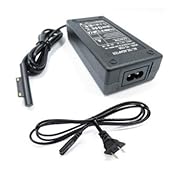
DHMXDC Surface charger: fails new PC, works old PC


I wanted to post this review on amazon.ca, but was not eligible[*], so I am posting here:

DHMXDC Magnetic US Plug Power Supply AC Adapter Cord for Microsoft Surface Pro 3/PRO 4 Intel Tablet (Pro 3 Adapter Without Usb)(Taboe Charger)Sold by: DHMXDCCDN$ 20.00
 
I forgot to bring an airplane-ready[**] laptop charger on a recent trip, so I purchased this from amazon.ca on the plane while travelling to Canada.

This charger did NOT work with the Microsoft Surface 2-in-1 tablet PC I was using on the trip. When plugged in (a) the charger connector lights up, as if working, but (b) PC system icon reports "plugged in, not charging".    This seems to be as reported by about half of the reviews.

I initiated a return request with amazon.ca the same day. The vendor responded, but had not authorized the return before I had to leave Canada.

On my return home, I found the the DHMXDC charger worked with an older Surface.  I will therefore keep it - too much hassle to get the vendor to complete the return authorization - but I will be reluctant to work with this vendor again. 

---

Note *: Since I live in the USA I normally use amazon.com, where I post reviews, rather than the Canadian site, amazon.ca which will not allow me to post a review unless I have purchased 50$ in the last 12 months.  Amazon.com will not allow me to post a review for a product I purchased on amazon.ca

Note **: by "airplane ready charger" I mean a charger that will work with the power outlets on many airlines.  The surface dock that I was travelling with drew too much current, and caused the air line power outlet to shut off.

Wednesday, December 26, 2018

IT forced password changes => weaker password

Every time my company's IT forces me to change my password, my password becomes weaker.

At least, the password(s) that I actually have to enter by hand, manually.  

Frankly, I don't care about weakening the passwords for my company accounts.  After all, it's their IT department that is enforcing this obsolete policy.

But it is annoying that company IT also forces me to change my personal password on my personal machines that I use to log in to company email and VPN.   Those personal passwords start out really string, but get weaker every time IT forces me to change them.  So it's my personal security that is being messed up by company IT.

Thursday, June 28, 2018

Treadmill (desk) needs speed ramps and intervals

I continue to love my LifeSpan TR1200-DT3 treadmill, since 2014.

At first I could only walk slowly, 1-1.4mph, while working.

Then, a year or so ago, I started being able to hit 2-2.5mph for some tasks, like email triage.

Recently I have started being able to run >= 4mph, typically while listening to "XXX Update Meetings", where I don't participate, and often don't need to take notes.

But... sometimes I need to take a note, and may need to slow down.  Not suddenly stop, but ramp down safely. 

(Stopping suddenly can be dangerous - I have twisted my knee several times when the emergency stop engaged.)

PROBLEM: the LifeSpan console changes speeds in clicks of 0.1mph.  Having to lean over and click 20 times to ramp down from 4.0 -> 3.9 -> 3.8 -> ... -> 2.1 -> 2.0 mph is inconvenient, and somewhat dangerous.

WISH: 2 or 3 speed buttons, with designated speeds.  And a smooth transition between them, not instantaneous.

EXTRA WISH: I sometimes do intervals on my treadmill desk, while listening to such meetings. 20 clicks to change speed is a pain.  After the 2 or 3 speed buttons, programmable intervals, would be nice.

DIY: yeah, I should do this in my copious spare time. There's a small community of folks who have made their own treadmill controllers using Arduino or Raspberry Pi or the like.

--

BTW, one big reason why I did not start running fast earlier was not my fitness level or even my sense of balance, but that I have had trouble adjusting the treadmill tension: if it runs smoothly at 0.4 mph it slips at 5mph, or it binds at 1mph when smooth at 5mph.

Google Blogger/Blogspot "Blog This!" plugin dead?

As of June 2018 the "Blog This!" plugin seems to have disappeared. Sob! My second most frequently used plugin. This may be my final straw for using Google Blogger / Blogspot. Google Blogger / Blogspot has been dying slowly for years.

Monday, May 21, 2018

I want to like Windows Controlled Folder Access, but ...

'via Blog this'


I want to like Windows Controlled Folder Access.  Essentially, restriction of access not just by user or group, but also by app.


But, of course, Microsoft made it so simplistic that gets in the way of my usage model.


For example:


  • Lack of Exclusion
    • There are protected folders.  This is good.   
    • You can add more protected folders.  This is also good.
    • But you can't EXCLUDE subfolder trees from protection.
    • This is bad..
    • My usage model:
      • I do a lot of my work in subfolders of Desktop.
      • I do a lot of my work using ad-hoc tools, like Perl and Cygwin
      • I would LIKE most of Desktop to be protected.
      • But I would like to allow all or most, at least a large number, of cygwin apps to have access to subfolder trees such as Desktop/Work-In-Progress
  • Apps are given all or nothing access
    • You can add apps to the permitted list. This is good.
    • But when you do so, the app is allowed to access all Cntrolled Folders. This is bad.
    • E.g. I would like EMACS to be able to access my working areas, like Desktop/Work-In-Progress.  
    • But I would like to disallow EMACS from accessing, say, system folders, or Music, or ...
    • Instead it's all or nothing. :-( 
  • Apps are individual
    • You can add apps to the permitted list. This is good.
    • But you have to add them one by one. This is bad.
    • E.g. I use cygwin.   I would like to add C:/Cygwin/bin/* to the permitted list.
      • But that is too much of a pain, so I just disable Controlled folders
Basically, app permissions are just like user permissions.  They need the same flexibility.

Controlled Folders does not.


---


This feels very much like Microsoft's initial, >10 years long approach to evolve network share permissions.


I hope that app permissions do not take so long.

Thursday, May 17, 2018

WISH: windows 10 dynamic lock - non-phone, non-paired

windows 10 dynamic lock fitbit - Bing:


'via Blog this'


  1. Lock your Windows 10 PC automatically when you step away from it.
    • Sounds great! :-)
  2. If you forget to lock your PC or tablet when you step away, Windows Hello can use a phone that's paired with your device to automatically lock it shortly after you're out of Bluetooth range. 
    • This sucks! :-(
What fraction of the population pair their phone with their PC?


  • I used to do device-PC pairing, back when I backed up my phone by synching to my PC.  And/or synched podcasts from net through PC to phone.
  • But now I mostly go direct from phone to cloud.  I don't Bluetooth pair phone to PC, not unless I am tethering a personal hotspot via BT.
  • In general, I try to avoid phone-to-PC paring, because it is a security hole.
Heck, what fraction of people have their phone in their pocket whenever they are at their PC?
  • OK, probably most
  • But not me.  
That's what I have a SmartWatch for.  Actually just a FitBit Versa, but good enough.

Dynamic Lock would be more useful to me if it detected the presence or absence of my FitBit.

But, again, I don't want to pair my FitBit with my PC.  I pair my FitBit with my phone.  I wear my FitBit even when my phone is far away, but even then there's an identifiabke BT signal.


NOTE: I don't want this to log IN>

Just to lock.


Wednesday, April 18, 2018

Rule Order Matters [in Outlook] [I wish]

The Three Most Important Outlook Rules for Processing Mail - Scott Hanselman: "rule order matters"


'via Blog this'


Yeah, ruke order matters.


Unfortunately, Outlook does not reliably process rules in order.


Not if some are server and some are not server rules


And if your machine is not always connected to the server - e.g. if mobile, or at home but net is unreliable.


https://blogs.technet.microsoft.com/outlooking/2015/05/01/client-side-vs-server-side-rules/


For many years, many of the most useful rules - eg rules that handled Internet, as opposed tgo MS Exchange, addresses were client-side rules.


I have not checked where MS draws the line nowadays, but I have been burnt badly by MS inconsistency in rule order.


"Microsoft SurfBook 3-finger taps"

Krazy Glew's Blog: What Else I have Tried: "Microsoft SurfBook 3-finger taps"


'via Blog this'


The Surface Book Precision Touchpad can be configured to supposedly

emit {MButton}, the middle button, for a 3 finger tap.

This is the only key mapping available for the touchpad;

all of the other mappings go straight to Windows 10 GUI shell functions.


My trackball is also configured to emit MButton when BL+BR are pressed.

This is commonplace - often on a mouse left+right=>middle


It is unfortunate that the touchpad can only emit MButton in a remappable way,

since MButton has certain standard definitions.


 E.g. "normal" uses of MButton, e.g. in xterm


  •  MiddleMouse ==> paste PRIMARY selection
  •  Ctrl+MiddleMouse ==> select to clipboard or show alternate screen


But, we are lucky!!!!

Actually the SurfBook Touchpad 3-finger "MButton"

is <#<+<+{F22}{MButton};

I thought at first to use this as a filter,

but even better[*] just hooking <#<+<+{F22}{MButton};

filters out the {MButton}.


I conjecture this is srelated to timing and buffering.

I conjecture it is fragile.


But, for now, I can bind Touchpad 3-finger to a menu. NAV_MENU_fn

and pass Trackball MButton through unaffected


elsewhere, in click+hold.ahk, I bind X1 doubleclick-hold to the same NAV_MENU_fn


The Surface Book Precision Touchpad

can be configured to supposedly emit {MButton}, the middle button, for a 3 finger tap.


actually, it emits:  LWin+LControl+LShift+F22, and then MButton


     5B  05B a d 0.88 LWin

     A2  01D a d 0.02 LControl

     A0  02A a d 0.00 LShift

     85  06D a d 0.00 F22

     85  06D a u 0.00 F22

     A0  02A a u 0.00 LShift

     A2  01D a u 0.00 LControl

     5B  05B a u 0.00 LWin

     04  000 h d 0.00 MButton

     04  000 a u 0.00 MButton


and in my present AutoHotKey c onfigurationthe MButton disappears - probably because of all of the zero latencies.

What Else I have Tried


http://blog.andy.glew.ca/2018/04/3dconnexion-spacemouse.html

http://blog.andy.glew.ca/2018/04/i-wish-kensington-turboball-trackball.html

I have tried many, many, trackballs.   I prefer finger trackballs to thumb-balls –
the larger the better.

I have tried many keyboards, including ergonomic keybopards.
I have GoldTouch, and Maltron.  I haven’t
tried Kinesis – mostly because I don’t touchtype. And I depend on mobility –
laptops, convertible tablets – so I like stuff I can use on plane.

I have tried many gaming mice. Also joysticks.   I occasionally break out some of my collection
when I have a lot of “triage” work to do. 8-16 buttons on each hand…

I have an XKey-16 stick, and have just ordered another for
work.  16 bindable keys, with AHK.  I sure wish that the keytops could have
dynamically changing symbols.

I have a lot of AutoHotKey bindings.  E.g. click, hold, double-click,
click-and-hold.  E.g. I have CapsLock-click
mapped to Backspace in Outlook, to archive with my left hand, and CapsLock-hold
mapped to legacy CapsLock.

Meta-observation: the biggest problem I have with AHK is
keycode collision. E.g. I have to resort to using ctl-alt-shift-Fn on my
Xkey-16, which I then map to app depend commands using AHK.  But I am running out of unique keycodes, and
am unhappy when the keycodes I want my devices to send collide with Windows and
app shortcuts.   

I really like https://www.quadro.me/,
which allows a touch iOS device, iPhone or iPad, to be used as a dynamically
remapped per-app button pad. But Quadro only works on an iOS device, and has other
limitations, so I implemented similar functionality in Python using
AppleScript. Was able to use cheap old Android phones and tablets as my “button-pads”.
When I switched back to using Windows touch devices, I started reimplementing
the button pads in AutoHotKey.  But I am
afraid that work got put on hold when I joined Nvidia.

I really like the touchscreen programmable button pads
(which I call gUIx, graphical User Interface extenders).   But having them emit keyboard sequences is
quite fragile. AppleScript works better. In Windows…

I have not tried http://www.e3-keys.com/english/index.htm,
nor Optimus Maximus.  I have not yet
preordered the Sonder keyboard, but am tempted.

I usually dislike touchpads - eg I wish that my laptop did not have an ALPs touchpad, so that I could have the keyboard that much closer to me, and possibly open the clamshell on a plane in economy class.   But on a recent long trip, no trackball, I started to enjoy the multi-finger-touch abilities of Microsoft's "Precision Touchpad", https://support.microsoft.com/en-us/help/4027871/windows-10-touchpad-gestures.  3-finger swipes to switch between open windows.  Especially, Microsoft SurfBook 3-finger taps - the only programmable gesture - supposedly mapped to Middle Button, but which actually produces
Win+Ctl+Shift F22. Which I have bound tap to Back, double-tap to Forward, and hold to a navigation menu.  Works nicely in web browsers and Outlook.  I wish that I could program 4 finger taps and other gestures.

I say the above mostly to say that I have tried a lot of
things – but if somebody
wants to recommend a “gaming trackball” with lots of buttons, I am listening
.
Or a crowdfunded project.